

Slurm
YanFlow cluster integrates Slurm internally, running in container mode. Users can add multiple independently running Slurm job systems in the cluster. To simplify configuration, users only need to select master node and compute nodes to submit jobs.
Features
The platform's Slurm job system uses entire machines as scheduling units, with a minimum of one machine scheduled as the master node. The master node can also perform scientific computing.
- Master Node Configuration: Runs database services (
slurmdbdandmysql),slurmctld(control service), andslurmdservice. - Compute Node Configuration: Runs only
slurmdservice.
The YanFlow cluster Slurm job system uses entire machines for scheduling, meaning at minimum one machine is scheduled (as master node), and the master node can also perform scientific computing. The master node runs database services (slurmdbd and mysql), slurmctld service, and slurmd service. Compute nodes only run the slurmd service.
- High Device Compatibility: The same Slurm job system supports managing heterogeneous configured machines (including GPUs, memory, CPUs, etc.), thanks to Slurm's native support.
- Simple Operation: Automatically completes relevant configurations between nodes, no need to prepare original Slurm configuration files.
- Job Visualization: Provides web-based job visualization reports, supports job cancellation via web interface.
- System-Level Isolation: Supports starting multiple independent Slurm job systems, with isolation between different systems, no mutual interference.
Slurm Introduction
Description
Slurm (Simple Linux Utility for Resource Management) is an open-source, fault-tolerant, and highly scalable Linux cluster supercomputing system resource management and job scheduling system. It is used to manage resources and jobs, avoid mutual interference, and improve operational efficiency.
Job submission commands:
- Interactive parallel
srun. - Batch mode
sbatch. - Allocation mode
salloc.
Architecture
Slurm uses slurmctld (daemon) as the central manager for monitoring resources and jobs, with configurable backup redundant managers.
slurmd: Daemon that needs to be started on each compute node, used to execute jobs and return status.slurmdbd(Slurm DataBase Daemon): Database daemon (optional, recommended), used to record accounting information across clusters.slurmrestd(Slurm REST API Daemon): Interact with Slurm through REST API (optional).- User Tools: Include
srun,scancel,sinfo,squeue,sacct.sviewprovides graphical display. - Management Tools:
scontrol(monitor/modify configuration) andsacctmgr(manage database authentication).
Terminology
Nodes
| Term | Description |
|---|---|
| Head Node | Master node, runs slurmctld management service. |
| Compute Node | Compute node, runs job computing tasks, needs to run slurmd service. |
| Login Node | User login node. |
| SlurmDBD Node | Database node, stores scheduling policies and accounting information. |
| Client Node | Includes compute nodes and user login nodes. |
Users
| Term | Description |
|---|---|
| account | Account, can contain multiple users. |
| user | User, can share an account. |
| bank account | Bank account, corresponds to machine hour fees, etc. |
Resources
| Term | Description |
|---|---|
| GRES | Generic Resource, generic resources. |
| TRES | Trackable RESources, trackable resources. |
| QOS | Quality of Service, affects job priority. |
| association | Association, used to implement user access control. |
| Partition | Queue/Partition, used to group and manage nodes, job size, duration, etc., and allocate resources. |
Plugins
Slurm plugins support various infrastructures and configurations:
- Accounting Storage: Stores job historical data.
- Account Gather Energy: Collects energy consumption of jobs or nodes.
- Generic Resources: Interface for controlling generic resources (such as GPU).
- Job Submit: Allows sites to override requirements raised during job submission.
- Scheduler: Determines when and how Slurm schedules jobs.
- Priority: Assigns priority to jobs.
- Process Tracking: Used to confirm processes associated with each job.
Configuration Modes
Slurm client node configuration has two modes:
- Traditional Mode: Client nodes use local configuration files such as
slurm.confunder the /etc/slurm/ directory. - Configless Mode: Supported since Slurm version 20.02, client nodes do not require local configuration files. Nodes obtain configuration from the
slurmctlddaemon, uniformly managed by the control node.
Configless Mode Specification: slurmd service obtains configuration from the specified slurmctld node when starting, can be specified through --conf-server parameter or DNS SRV record.
- Using
--conf-serverparameter (default port 6817 can be omitted):- Single management node:
slurmd --conf-server slurmctl-primary:6817. - Primary-secondary management nodes:
slurmd --conf-server slurmctl-primary:6817,slurmctl-secondary.
- Single management node:
- Using DNS SRV Record:
_slurmctld._tcp 3600 IN SRV 10 0 6817 slurmctl-backup._slurmctld._tcp 3600 IN SRV 0 0 6817 slurmctl-primary.
Creation Steps
Creating a Slurm job system is simple. In the platform's job management Slurm section, click Add, then select master node (required) and compute nodes (add according to needs, can be omitted), select appropriate image. Below is a simple example for reference.
Example
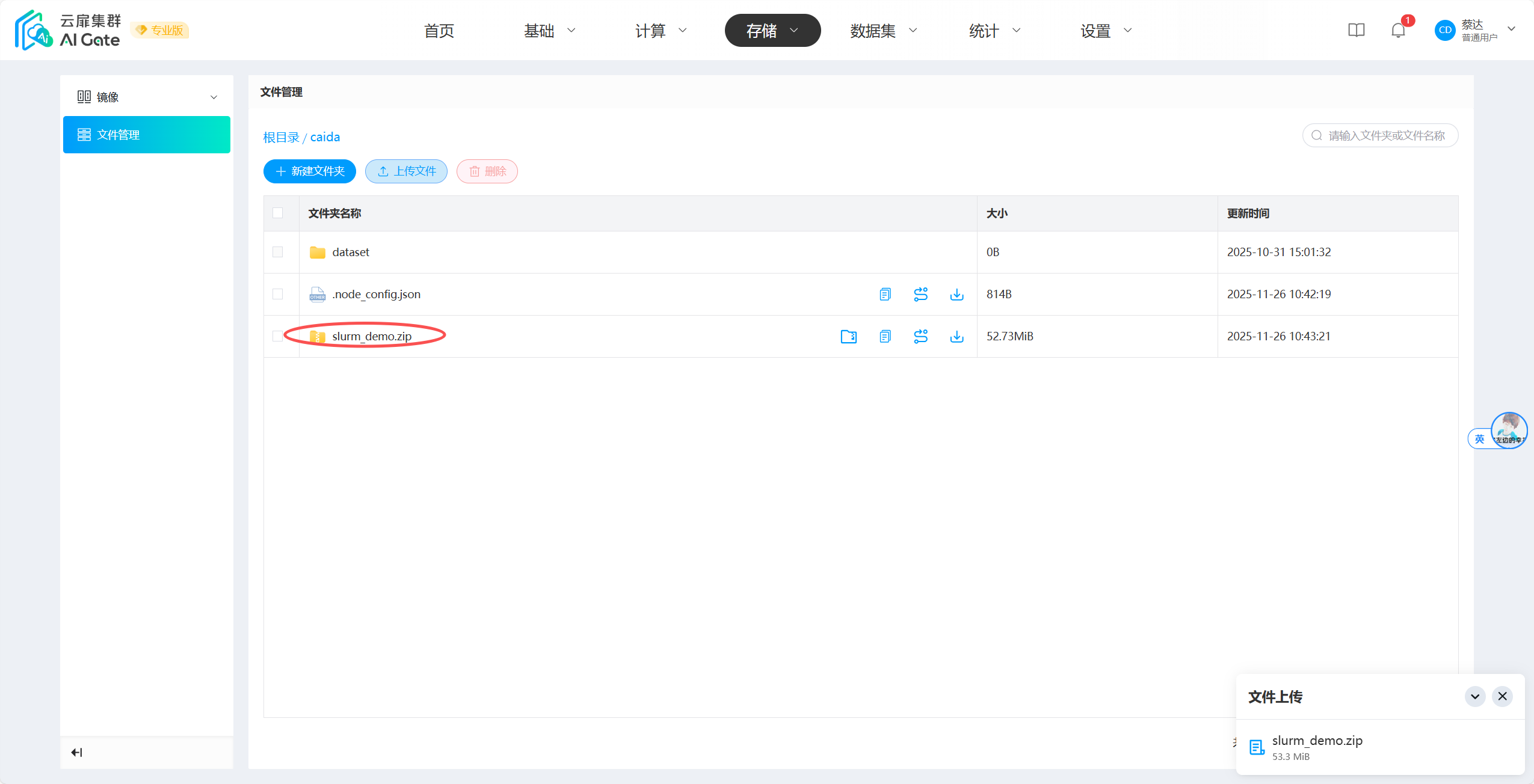
We provide runnable code, download here. After downloading, upload to user directory.
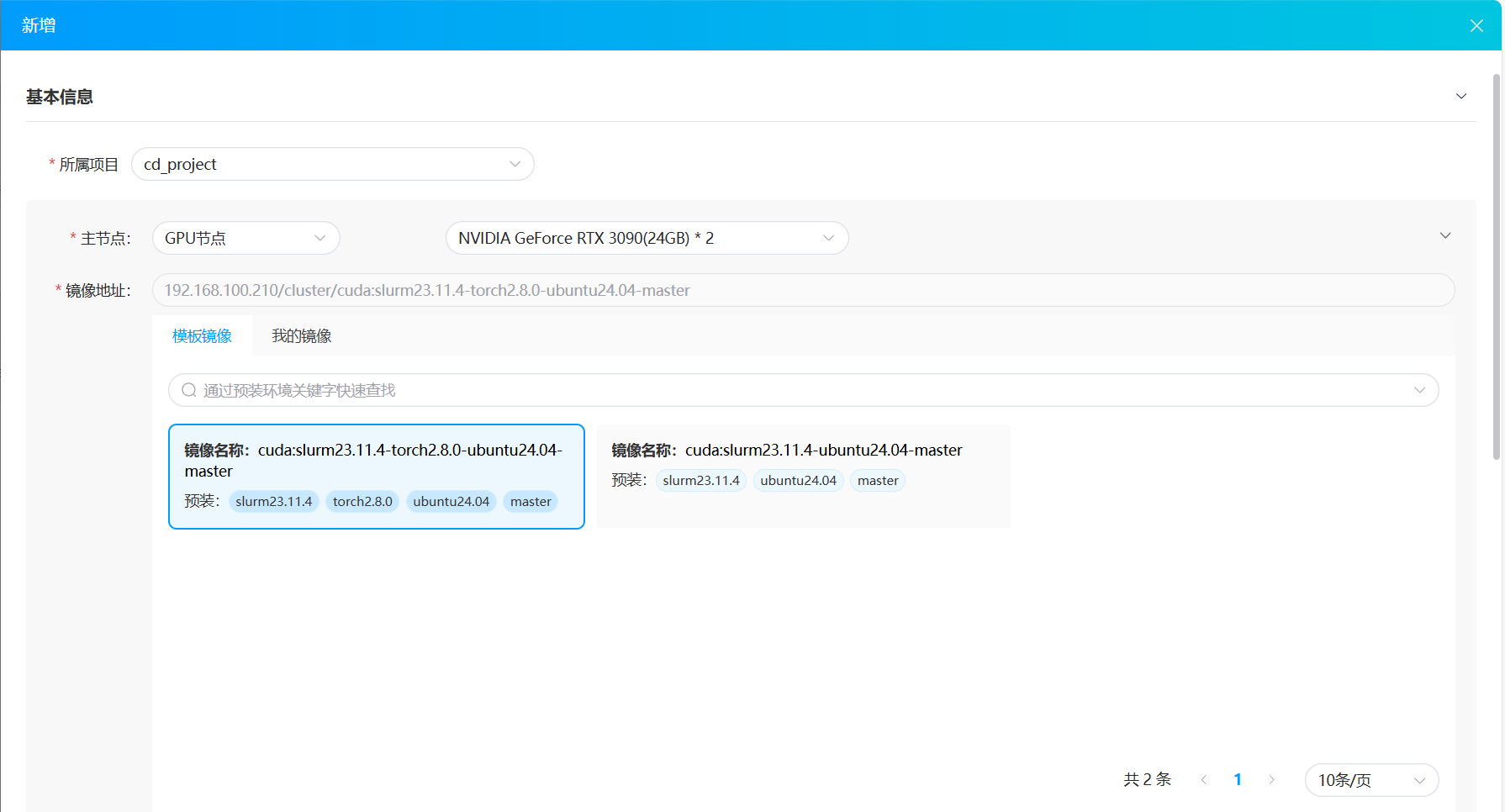
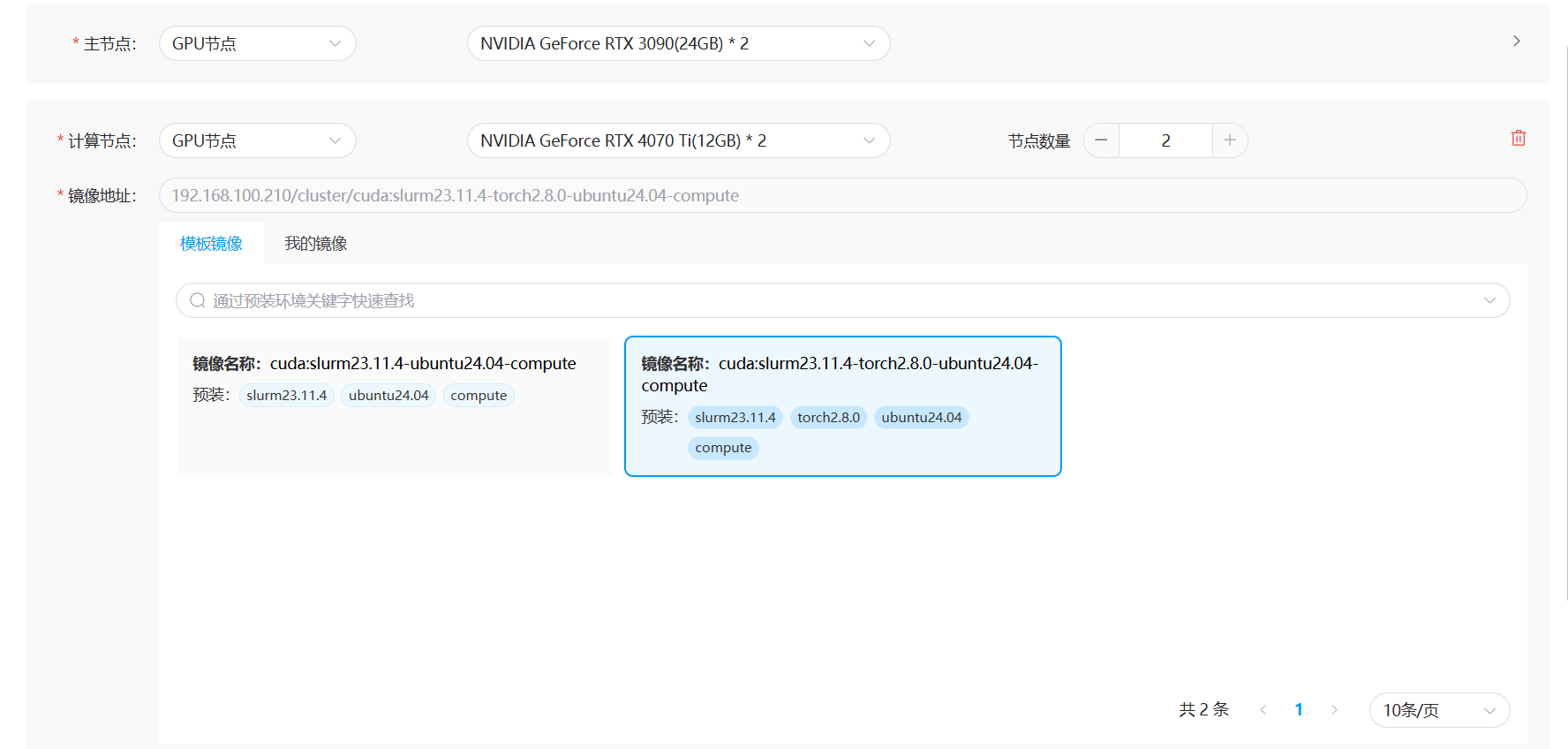
Click to add Slurm job, and select master node and compute nodes. Note that master node and compute node images are different; master node has "master" label, compute node has "compute" label.
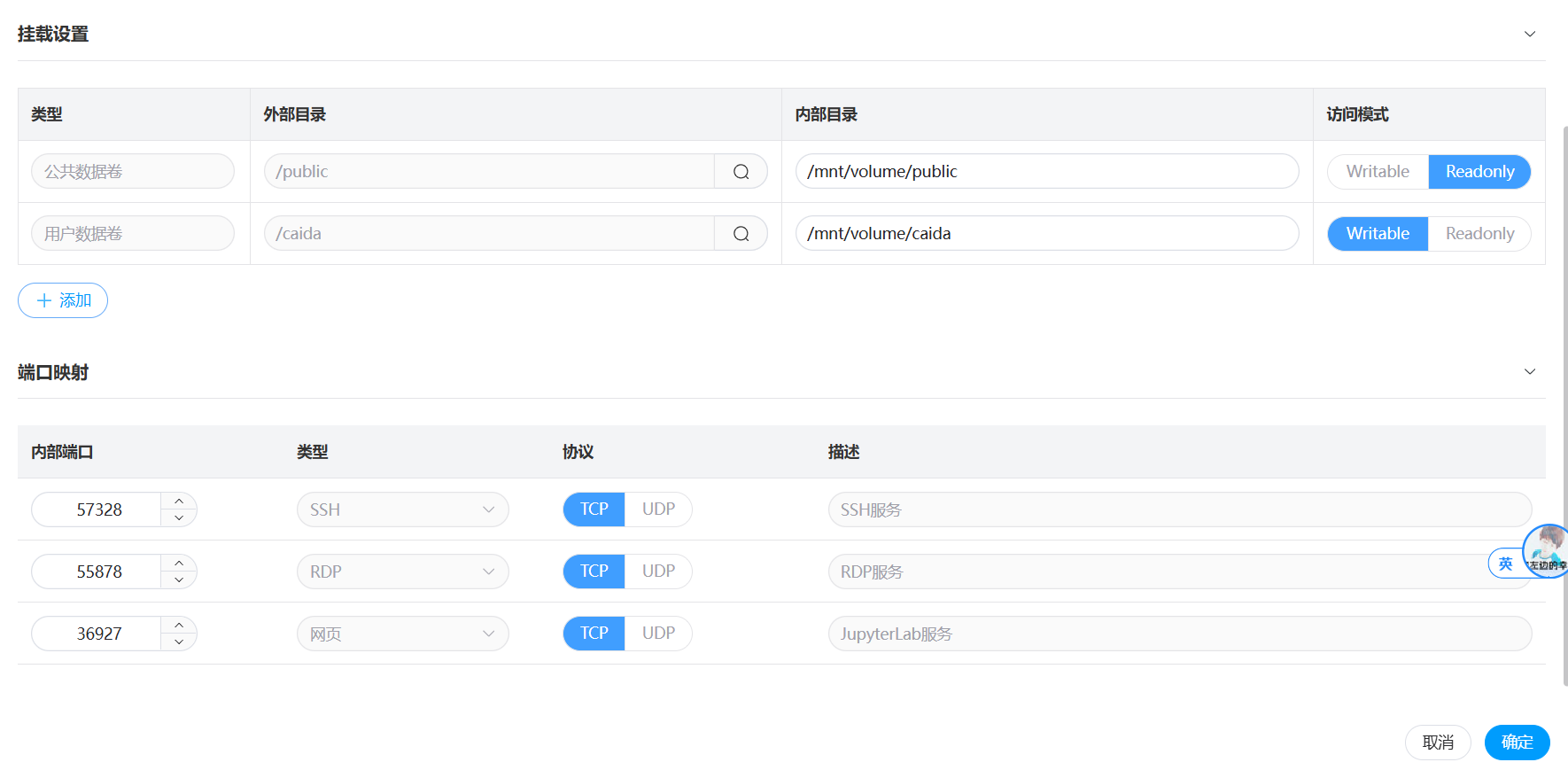
After waiting for nodes to start, enter Console, input sinfo to check if all nodes are idle.

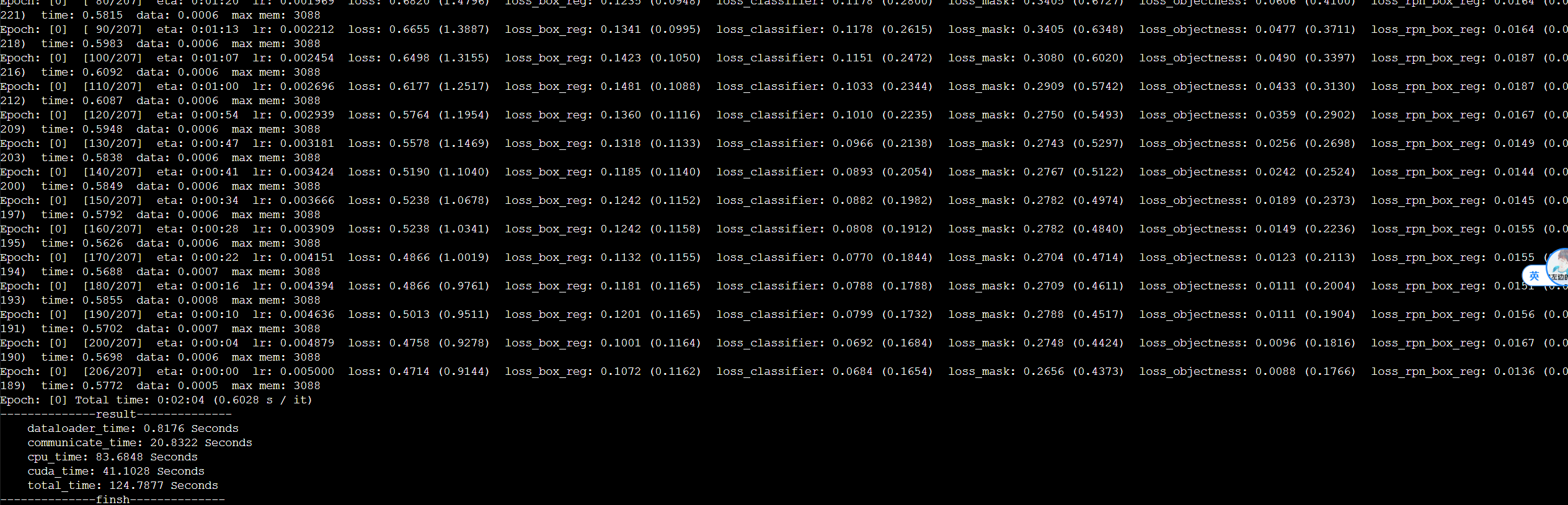
Extract code files and execute multi-machine training.
cd /mnt/volume/{your-user-directory}   # Here it is cd /mnt/volume/caida
unzip slurm_demo.zip
cd slurm_demo

# Install relevant dependencies
sbatch -N2 --partition=rtx4070ti --wrap "pip install -r requirements.txt"

# Training: specify 2 nodes, 2 GPUs per node
srun --partition=rtx4070ti -N2 -n4 --gres=gpu:2 --ntasks-per-node=2 --job-name=slrum_test python3 -u train.py
Note that the number of nodes, partition name, number of processes per node, and GPU count should be determined based on actual environment quantities. This is just a demonstration of 2-node training with partition name rtx4070ti and 2 GPUs per node.
More Information
The YanFlow cluster Slurm job system encapsulates Slurm and provides web-based visualization job reports. Users can view job status and cancel jobs;
The Slurm job system has three default connection methods: SSH, RDP, and JupyterLab. They provide the master node IP; compute node IPs can be queried by entering the master node, password is the same as master node;
To avoid copying data on each node in multi-machine tasks, please use the cluster's distributed storage. Each node inside the Slurm job system has the user directory
/mnt/volume/{username}and public directory/mnt/volume/publicmounted by default;Slurm containers use
hostmode, no port mapping required, directly use IP+port to access custom services;If modifications cause Slurm to become unusable, you can recreate the Slurm job on the page. Slurm-related configuration files are in the
/etc/slurm/folder;If GPUs exist, the default partition (
PARTITION) set for nodes is the GPU name, same model GPUs are merged. For CPU nodes, partition name is CPU model, same model CPUs are merged. If partition settings do not meet actual usage requirements, please modify the Slurm configuration file;To allow containers to perform resource allocation/process management like the host, running containers are set with privileged permissions, systemd is installed, and host cgroup is mounted. Please do not perform dangerous operations when using.
Docker in Docker
The Slurm containers running in YanFlow cluster are configured with privileged permissions and systemd, allowing Docker to be installed inside containers (not recommended). Docker inside the container is an independent DinD (Docker-in-Docker), will not directly affect host services. Installation steps:
# Execute as root user
apt-get update
apt-get install -y ca-certificates curl gnupg lsb-release
mkdir -p /etc/apt/keyrings
curl -fsSL https://download.docker.com/linux/ubuntu/gpg | sudo gpg --dearmor -o /etc/apt/keyrings/docker.gpg
echo \
  "deb [arch=$(dpkg --print-architecture) signed-by=/etc/apt/keyrings/docker.gpg] \
  https://download.docker.com/linux/ubuntu \
  $(lsb_release -cs) stable" | \
  tee /etc/apt/sources.list.d/docker.list > /dev/null
apt-get update
apt-get install -y docker-ce docker-ce-cli containerd.io
systemctl start docker
Unless necessary, installing Docker in containers is not recommended. Potential issues include:
- File system operations are slightly more complex, performance will be slower than directly on the host;
- "device or resource busy" errors may occur in some cases;
- Container mounts
--cgroupns=host, if many containers are started in DinD container, host resources will also be consumed;- Docker network (bridge, overlay) in DinD container may have some port conflicts or delays.
Common Operation Commands
systemctl restart slurmctld     # Restart slurmctld
systemctl restart slurmd        # Restart slurmd
sinfo                           # View all node status information
scontrol show node ${NodeName}  # View specific information of a node
scontrol update NodeName=${NodeName} State=RESUME  # Attempt to fix a node
scontrol reconfig               # Refresh configuration file to take effect
squeue                          # View running jobs
scancel ${job_id}               # Cancel job
sacct                           # View all jobs
sbatch run.sh                   # Submit job
Precautions
High Privilege (
privileged) Security Risk:- YanFlow platform's Slurm is configured in containers and granted high privileges (
privileged), enabling CPU core allocation and system resource management like deployment on the host. - However,
privilegedpermissions break container security isolation. Processes in the container can directly operate host devices, load kernel modules, and even modify host file systems (such as/etc,/var/lib/docker, etc.). - Unless you clearly know the consequences of operations, please do not perform similar dangerous operations.
- YanFlow platform's Slurm is configured in containers and granted high privileges (
Configuration File Risk:
- The platform configures runnable configuration files for Slurm by default (
/etc/slurm/slurm.conf). - Arbitrarily modifying this file may cause Slurm functionality to become unusable.
- If you are very familiar with Slurm configuration, you can modify it yourself, but remember to restart relevant services.
- The platform configures runnable configuration files for Slurm by default (
Network Mode Conflict:
- Slurm containers use
hostmode when running, meaning they use host ports. - Please note if there are port conflicts, otherwise relevant services may not start.
- Slurm containers use
Connection Configuration Stability:
- Slurm job system provides three connection methods: SSH, RDP, JupyterLab.
- Please do not arbitrarily change relevant configuration files, otherwise it may lead to inability to connect.